LobeHub
LobeHub

Changelog

Track new features, fixes, and improvements in LobeHub.

50+ New Models and 10+ Providers Added to the Ecosystem

50+ New Models and 10+ Providers Added to the Ecosystem

LobeHub completed its largest AI ecosystem expansion this February. The goal is straightforward: give you access to more capable models across more providers without breaking your existing workflow or requiring new setup steps.

Expanded provider and reasoning coverage

This release adds 10+ mainstream providers spanning global and domestic platforms. You can now connect to a wider range of services directly from your existing LobeHub setup.

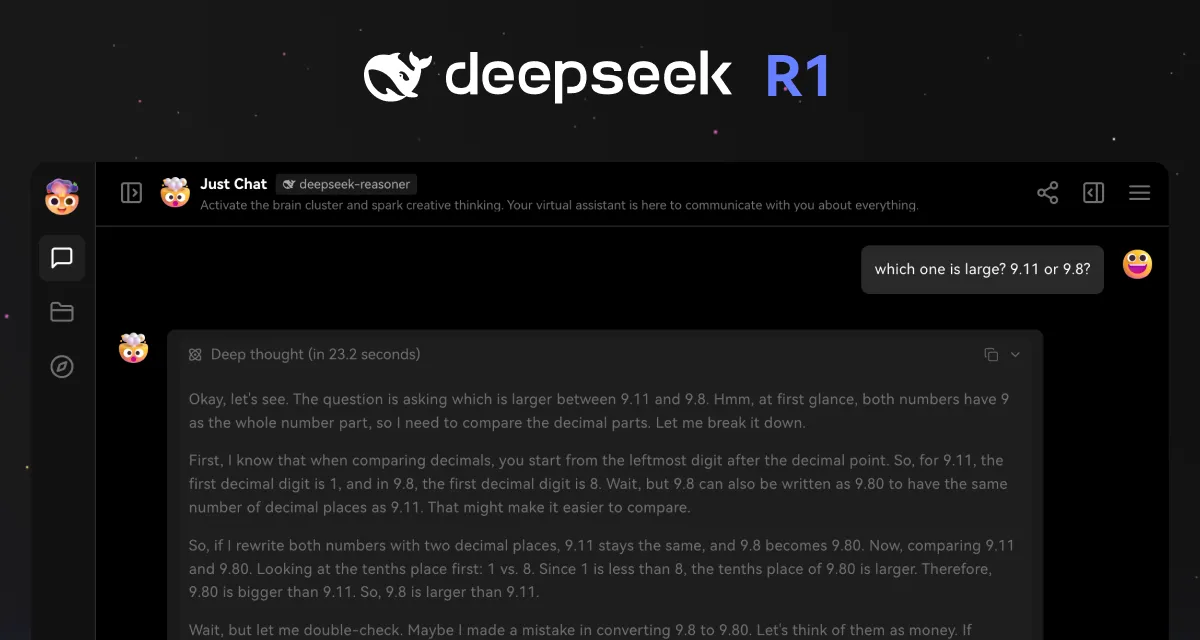
DeepSeek R1 is now fully supported, and reasoning-model compatibility has expanded to include Claude 3.7 Sonnet and OpenAI o3-mini. These models display their chain-of-thought in real time, so you can follow how conclusions are reached. DeepSeek R1 parsing is consistent across providers, making reasoning output easier to read in daily use.

Rebuilt search capabilities

Online search has been upgraded with SearchXNG and Perplexity integration, plus support for deep web crawling. Gemini 2.0 and Qwen series models can now use native search as part of their reasoning process.

Use these updates to:

  • Research topics with live web results directly in chat
  • Compare how different providers handle the same search query
  • Access deeper content extraction without leaving the conversation

Model library refresh

This release updates 50+ model configurations to keep your options current:

  • OpenAI: gpt-4.5-preview
  • Anthropic: Claude 3.7 Sonnet, Haiku 3.5
  • Google: Gemini 2.0 series improvements
  • Domestic providers: Moonshot, Tongyi Qwen, MiniMax latest models
  • Additional platforms: Perplexity, Cloudflare, SiliconFlow refreshes

Improvements and fixes

  • Fixed reasoning display inconsistencies across model providers
  • Improved search result formatting for better readability
  • Enhanced model parameter synchronization across providers

Credits

Huge thanks to these contributors:

@AmAzing129 @hezhijie0327 @arvinxx @lobehub-team

v1.67.2 ~ v1.49.13
DeepSeek R1 Integration with Chain-of-Thought Transparency

DeepSeek R1 Integration with Chain-of-Thought Transparency

LobeHub v1.49.12 now supports DeepSeek R1 across both Community and Cloud editions. This integration brings the model's reasoning process into full view, so you can follow how complex questions are solved step by step.

Transparent reasoning in every conversation

DeepSeek R1's chain-of-thought capability is now fully integrated. When the model works through a problem, you see its reasoning unfold in real time rather than receiving only the final answer.

In practice, this means debugging a script, working through a math problem, or analyzing a complex topic becomes more collaborative. You can see where the model's logic aligns with your intent and where it might need clarification. The reasoning display appears naturally in the conversation flow without cluttering the interface.

How to use DeepSeek R1

  1. Upgrade to LobeHub v1.49.12 or visit LobeHub.com
  2. Select DeepSeek R1 from the model dropdown
  3. Start a conversation and watch the reasoning appear as the model thinks through your request

Improvements and fixes

  • Fixed reasoning content parsing for consistent display across different response types
  • Improved chain-of-thought rendering performance for long reasoning sequences

Credits

Thanks to the community members who contributed to this release:

@arvinxx @hezhijie0327 @lobehub-team

v1.49.12 ~ v1.47.8

Custom AI Provider Management

Custom AI Provider Management

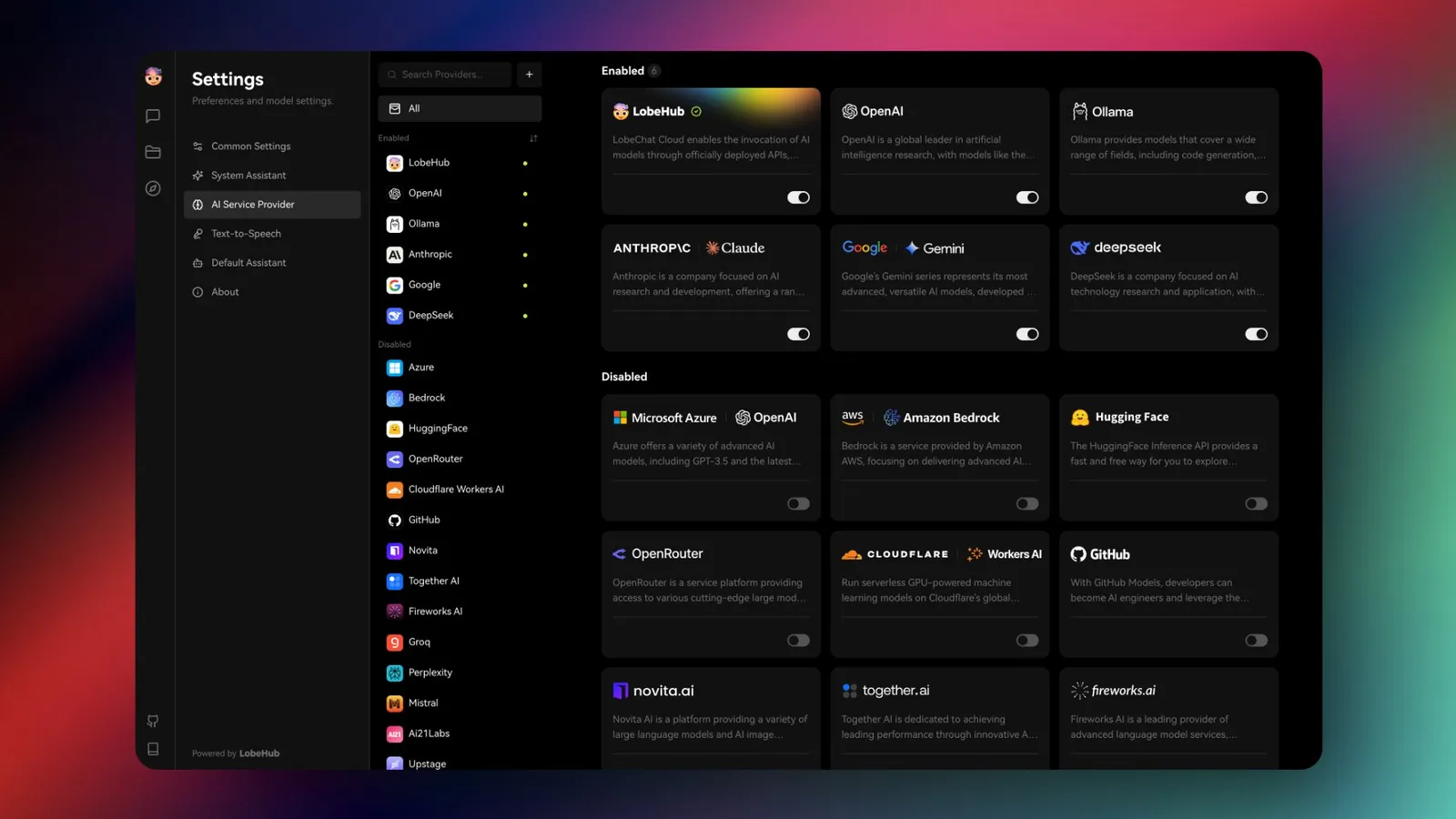
The provider management system has been rebuilt from the ground up. Now you can add your own AI providers, edit existing ones, and configure custom models with specific capability settings. Available in both the open-source edition and LobeHub Cloud.

Full control over your providers

Previously, you were limited to a fixed set of pre-configured providers. The new system lets you:

  • Add custom providers: Connect to any OpenAI-compatible API endpoint
  • Edit existing setups: Modify provider settings without waiting for updates
  • Configure custom models: Define your own model entries with specific capabilities (vision, function calling, file support)
  • Remove unused providers: Clean up your list to focus on what you actually use

Multimodal ready

The system supports language, image, and voice capabilities today. Configure which models can process images, which support tool calling, and which handle file uploads. Video and music generation support is planned for upcoming releases.

Feedback

Have suggestions for the provider management system? Join the conversation in GitHub Discussions.

v1.47.7 ~ v1.43.1

Personal Statistics and Activity Sharing

Personal Statistics and Activity Sharing

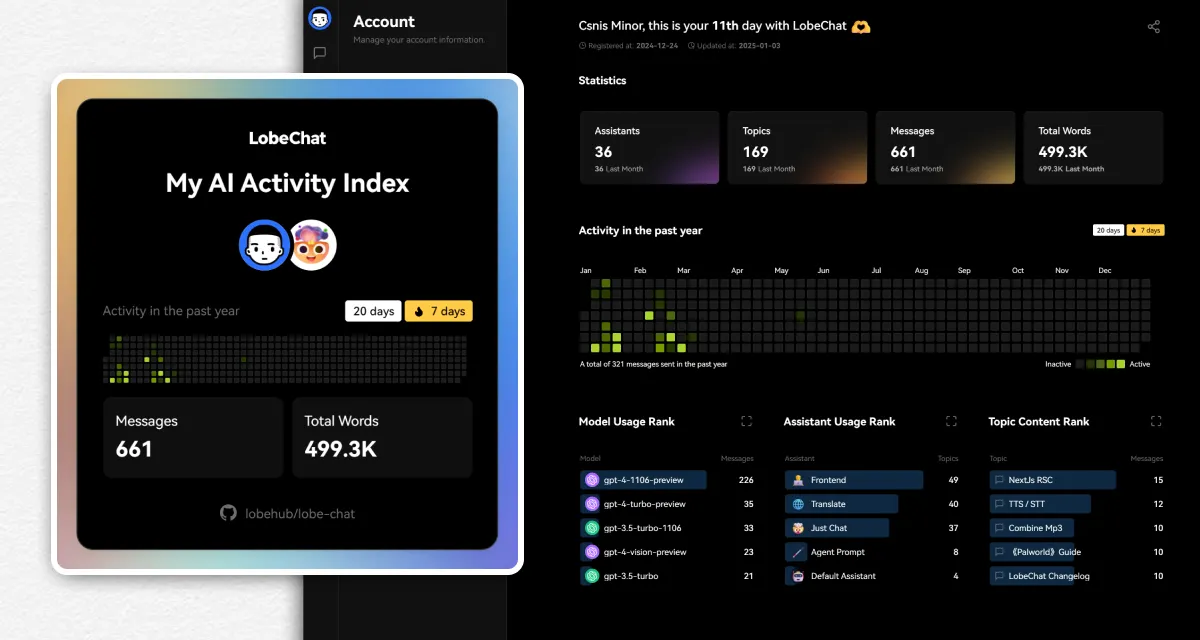
Want to see how you have been using LobeHub? The new statistics page gives you a clear view of your activity patterns, from agent usage to message volume. You can also generate a shareable activity card to post or send to friends.

What you can track

The statistics dashboard shows:

  • Overview counts: Agents created, topics started, messages sent, and total words generated
  • Top lists: Your most-used models, favorite agents, and longest topics
  • Activity heatmap: A visual timeline of your usage over the past year

Use this to understand your own patterns, identify which agents you rely on most, or simply see how your usage has grown over time.

Share your activity

Generate a personal activity image that summarizes your stats in a clean, shareable format. Post it to social media or share with teammates to compare AI workflows.

Getting started

Statistics are available in PgLite and Database deployment modes. Open your account menu, go to Data Statistics, and your dashboard will load automatically.

v1.43.0 ~ v1.34.1

Branch Conversations from Any Message

Branch Conversations from Any Message

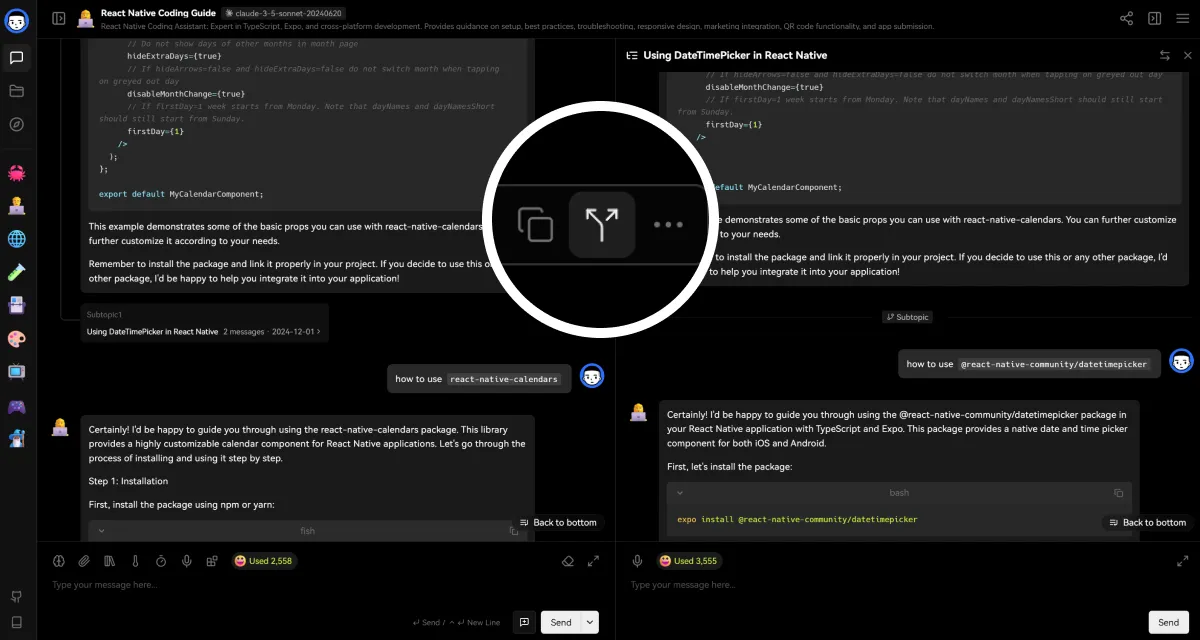
Conversations rarely stay linear. You follow a tangent, want to test a different approach, or need to split the thread for different audiences. Now you can create a branch from any message and explore alternative paths without losing the original flow.

Two ways to branch

When you create a branch, choose how to handle context:

  • Continuation mode: Keep the full conversation history and continue from that point. Useful when you want to explore "what if" scenarios while preserving context.
  • Standalone mode: Start fresh from the selected message. Good for extracting a clean sub-conversation or preparing a focused excerpt to share.

How it works

Click the branch button on any message to start a new thread. The original conversation stays intact while you explore the new direction. Switch between branches from the topic sidebar to compare outcomes or continue whichever path proves most useful.

Feedback

Have ideas for improving conversation branching? Share them in GitHub Discussions.

v1.34.0 ~ v1.33.1
LobeHub

Super-Agents on Your Team

Bring Super-Agents onto your team, starting today.